





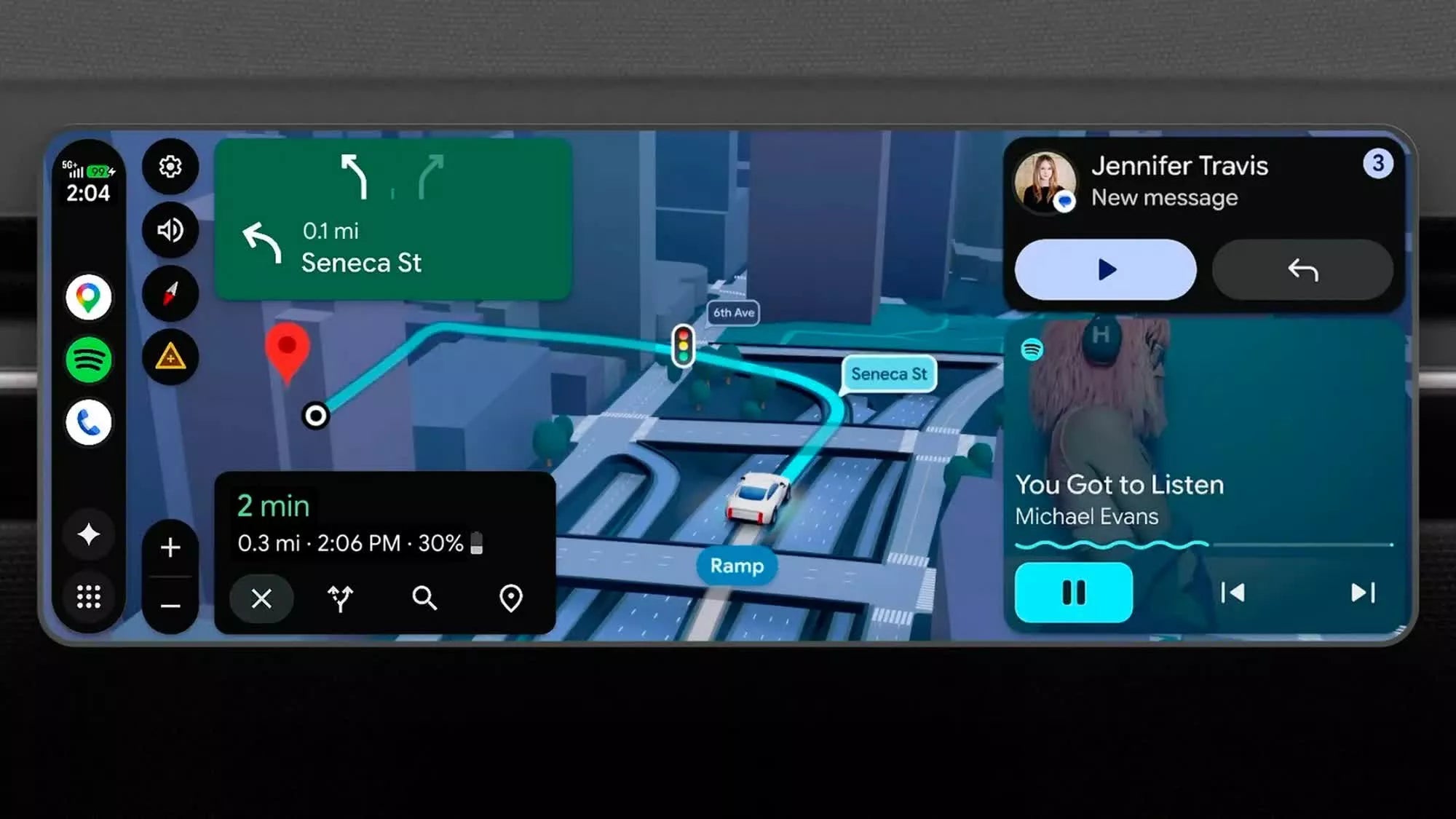
Google is redesigning Android Auto to better fit modern vehicle displays, adding full-screen navigation, customizable widgets, AI-powered assistance, and video playback support. The update allows Android Auto to automatically adapt to different screen shapes and sizes for the first time since the platform launched.
The changes are part of Google’s broader effort to make Android Auto feel more integrated with vehicle hardware rather than simply mirroring a smartphone interface.

Android Auto Now Uses The Entire Display
One of the biggest changes in the latest Android Auto update is its new adaptive layout system.
Previously, the interface often left unused areas around irregularly shaped displays. With the redesign, apps such as Google Maps can now stretch across the full width of a vehicle’s screen, regardless of whether the display is curved, circular, trapezoidal, or unusually proportioned.
Google demonstrated the feature across several vehicle interiors, including models with non-traditional dashboard layouts. Navigation remains the centerpiece of the interface, while controls and shortcut buttons are repositioned to fit each screen naturally.
The company says this flexible formatting system was developed to better support the growing variety of automotive display designs now entering the market.
Widgets Can Stay Visible During Navigation
The refreshed system also introduces persistent widgets layered directly over navigation.
Drivers can keep controls for music playback, calendars, garage door access, and other functions visible without leaving the map screen. Depending on available display space, vehicles may support one or multiple rows of widgets simultaneously.
This approach reduces the need to switch between apps while driving. Instead of replacing the navigation interface entirely, Android Auto can now display secondary information alongside active route guidance.
The update reflects how infotainment systems are increasingly moving toward smartphone-style multitasking experiences.
Google Maps Adds A More Detailed Navigation View
The redesign is closely tied to Google Maps’ upgraded visual navigation system.
Google says the newer navigation mode includes expanded 3D environmental rendering that displays buildings, road elevation changes, overpasses, and surrounding terrain in greater detail. Important traffic elements such as lane guidance, traffic lights, and stop signs are also emphasized more clearly during navigation.
The goal is to make route guidance easier to understand at a glance, particularly in dense urban environments or unfamiliar areas.
As vehicle displays continue increasing in size and resolution, automakers and software providers are investing more heavily in visually rich navigation interfaces that can better use available screen space.
Video Playback Is Coming To Supported Vehicles
Another major addition is support for high-definition video streaming.
Later this year, Android Auto will begin supporting 1080p video playback at 60 frames per second in compatible vehicles. The feature will initially roll out to selected models from manufacturers including BMW, Ford, Genesis, Hyundai, Kia, Mercedes-Benz, Renault, Skoda, Tata, Volvo, and several others.
Streaming apps such as YouTube will only display video while the vehicle is parked. Once the car starts moving, the visual feed will automatically disappear for safety reasons.
However, apps that support background playback may continue streaming audio even after driving begins. That behavior mirrors how many mobile video applications already function on smartphones and tablets.
Dolby Atmos And Gemini AI Are Also Expanding
Google is also expanding audio and AI capabilities inside Android Auto.
Support for Dolby Atmos spatial audio is scheduled to arrive in supported vehicles and apps, potentially improving in-car music and entertainment experiences through more immersive sound processing.
At the same time, Google’s Gemini AI platform is becoming more deeply integrated into Android Auto functionality.
According to Google, Gemini will be able to interpret conversational context and proactively assist drivers with common tasks. One example involves handling incoming messages requesting location details. Gemini may automatically search connected texts, emails, or calendar information to suggest an accurate reply.
Google also demonstrated broader task automation examples, including ordering food pickup through connected services using voice interaction alone.
The company sees AI as a major part of future in-car software ecosystems, particularly as drivers increasingly expect voice assistants to behave more like full digital agents instead of simple command systems.

FAQ
What is changing in the latest Android Auto update?
The update adds adaptive full-screen support, customizable widgets, upgraded Google Maps visuals, video playback, Dolby Atmos audio, and deeper Gemini AI integration.
Can Android Auto now fill irregular car screens?
Yes. Google redesigned Android Auto so it can automatically adjust to different display shapes, including curved, circular, and trapezoidal screens.
Will Android Auto support video streaming while driving?
No. Video playback will only appear when the vehicle is parked. Once the car starts moving, the video feed disappears automatically for safety reasons.
Which automakers will support Android Auto video playback?
Initial support is expected in selected vehicles from brands including BMW, Ford, Genesis, Hyundai, Kia, Mercedes-Benz, Renault, Skoda, Tata, and Volvo.
What does Gemini AI do inside Android Auto?
Gemini AI can interpret conversational requests, retrieve contextual information from connected services, and help automate tasks such as replying to messages or managing appointments.
Does the update improve navigation visuals?
Yes. Google Maps now includes enhanced 3D route visualization with clearer lane guidance, terrain rendering, traffic signals, and environmental details.
Recommend Reading: Google Maps Adds EV Route Planning to Android Auto







Share:
Rivian AI Assistant Begins Rolling Out to Users Now
Honda Shifts Focus Back to Hybrid Vehicles